Automated Keap List Cleaning: Fix Hard Bounces & Protect Campaign Builder Inboxing
By Dave Lee, ListDefender
Managing email deliverability is crucial for any business utilizing email marketing, especially those using Keap (formerly Infusionsoft). Hard bounces pose significant challenges by indicating that emails cannot be delivered to recipients, which can negatively impact sender reputation and campaign effectiveness. This comprehensive article delves into advanced strategies for automated Keap list cleaning, particularly focusing on fixing hard bounces and ensuring optimal inbox placement within Keap Max Classic and the Campaign Builder sequence automation environment.
Readers will learn effective methods to clean their email lists, best practices for maintaining high deliverability, and insights into the impact of hard bounces on their email marketing performance. Key topics include understanding the nuances of tag-based list hygiene, exploring spam traps—both pristine and recycled—and utilizing advanced tools such as automated list cleaning solutions with ListDefender. The article additionally covers how to leverage REST API v2 webhooks and email validation API to maintain a clean Keap contact database while avoiding pitfalls such as open rate degradation and ISP spam filtering.
Strategies for Fixing Hard Bounces in Keap
Fixing hard bounces is essential for maintaining a healthy email list and ensuring that future campaigns reach the intended audience in Keap. Businesses must implement effective strategies that integrate smoothly with Keap features and APIs.
- Implement Real-Time Email Verification: Utilize email validation API integration with Keap at the point of lead capture to immediately identify invalid email addresses before they enter your database, reducing initial bounce risk.
- Schedule Regular List Scrubbing: Automate cleaning of your contact database with tools compatible with Keap’s Campaign Builder sequence automation. This maintains accuracy and helps manage tag-based list hygiene by removing or flagging contacts with hard bounce history.
- Monitor Engagement Metrics: Analyze open and click rates to identify inactive contacts. Use Keap's tagging system combined with automated workflows to segment or suppress inactive users, reducing chances of ISP spam filtering.
Implementing these strategies collectively enhances list quality and proactively mitigates the effects of hard bounces.
Best Practices for Protecting Inboxing in Keap Campaign Builder
To secure high inbox placement rates, it's essential to adopt best practices native to Keap and supported by automation tools:
- Integrate Form Protection: Prevent spam traps—including elusive pristine vs recycled spam traps—by implementing form validation and CAPTCHA, ensuring only valid sign-ups enter your Campaign Builder sequences.
- Continuous Monitoring: Use REST API v2 webhooks for real-time list updates and continuous bounce monitoring to detect deliverability issues early.
- Educate Your Team: Ensure your marketing and sales teams understand the importance of list hygiene, bounce handling, and campaign timing to minimize risks of being flagged as spam.
By following these practices, businesses can significantly reduce the risk of being marked as spam and improve overall email deliverability rates.
Potential Impacts on Email Marketing Performance
A clean Keap contact database directly benefits the efficacy and cost-efficiency of email campaigns:
- Improved Deliverability: Reduced hard bounces and spam traps increase inboxing rates, particularly with major ISPs like Gmail and Yahoo, reinforcing your sender reputation.
- Enhanced Engagement Rates: Targeting engaged contacts leads to higher open rates, reducing open rate degradation often caused by stale lists.
- Stronger Sender Reputation: Clean data feeds positive scoring algorithms, minimizing negative impacts from bounces or complaints, and preventing ISP spam filtering.
Prioritizing database maintenance yields measurable improvements in campaign ROI.
What Are Hard Bounces and How Do They Affect Infusionsoft Email Deliverability?
Hard bounces occur when emails are sent to invalid addresses or domains that no longer exist. In the context of Keap (formerly Infusionsoft), these bounces send negative signals to ISPs that can throttle your email deliverability. Persistent hard bounces may result in campaigns being filtered out or landing in the spam folder.
Mitigating hard bounces involves recognizing different bounce types, such as permanent errors or domain-level issues, and employing corrective actions including removal, re-engagement, or validation through APIs.
How Do Hard Bounces Impact Campaign Builder Inboxing Rates in Keap?
The accumulation of hard bounces within Keap Campaign Builder sequences escalates ISP scrutiny, increasing the probability of ISP spam filtering and lowering inbox rates. This not only affects the current campaign but causes long-term damage to your sender score.
Proactive management of bounce data, including automated removal and tagging of invalid contacts, helps maintain high inboxing rates and protects your deliverability metrics over time.
How Does Automated List Cleaning Improve Keap Contact Database Hygiene?
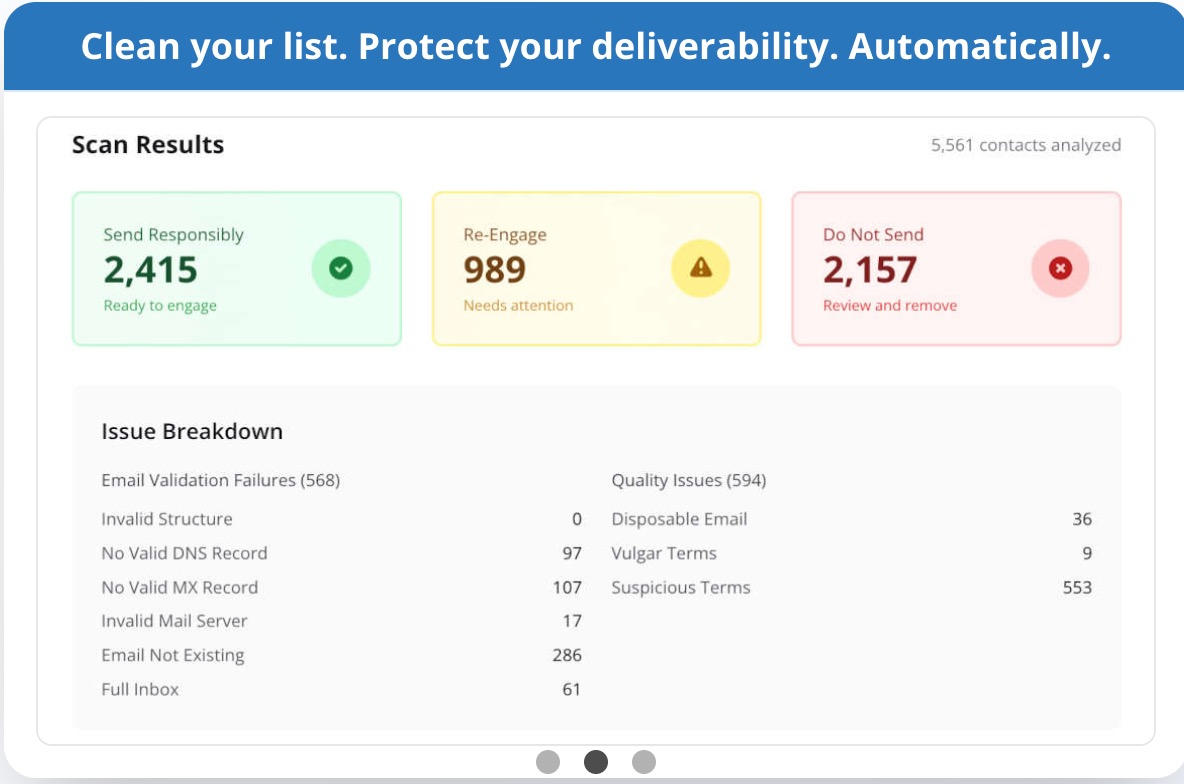
Automated list cleaning streamlines maintaining a pristine database by integrating with Keap’s API and Campaign Builder. Key improvements include:
- Continuous Monitoring: Real-time validation ensures immediate detection of bad emails during list growth and ongoing maintenance.
- Data Accuracy: Automation prevents errors that manual processes might miss, including false positives and outdated contacts.
- Improved Engagement Metrics: By eliminating invalid and unengaged contacts, automated cleaning optimizes open rate, click rate, and overall campaign health.
Platforms like ListDefender use advanced algorithms and Keap integration to automate these tasks, allowing teams to focus on strategy instead of maintenance.
Comparison Table: Manual Keap Tagging & Pruning vs. Native Inactive Contact Rules vs. ListDefender Real-Time Continuous Cleaning
| Feature | Manual Keap Tagging & Pruning | Native Inactive Contact Rules | ListDefender Real-Time Continuous Cleaning |
|---|---|---|---|
| Integration | Fully manual with basic automation using tags | Built into Keap; limited customization | API-driven, seamless in Campaign Builder sequences and webhooks |
| Bounce Detection | Delayed; relies on manual review | Automatic inactive rule triggers; may miss subtle issues | Continuous real-time detection via email validation API |
| Handling Spam Traps | Manual identification prone to misses | No direct spam trap protection | Proactively identifies pristine and recycled traps |
| Contact Database Hygiene | Depends on disciplined manual efforts | Automatic for inactive contacts only | Full automation with tagging, pruning, and validation |
| Pricing Tier Management | Not addressed effectively | Partially managed via inactive rules | Helps prevent unnecessary subscriber tier inflation |
| Setup Effort | High manual effort, error-prone | Simple setup but limited scope | Initial integration; automated ongoing maintenance |
Step-by-Step Setup Guide: Configuring Keap Campaign Builder Sequences and Webhook Triggers for Automated List Cleaning
To set up automated cleaning and invalid contact tagging within Keap Campaign Builder using webhooks, follow these steps:
- Create a Campaign: Log in to Keap Max Classic and navigate to Campaign Builder. Create a new campaign dedicated to list cleaning.
- Design the Sequence: Add a sequence to the campaign where you will configure bounce handling and validation steps.
- Set Up HTTP POST Webhook: Within the sequence, add an HTTP POST action. Configure this to call the email validation API or ListDefender's endpoint to validate new or existing contacts.
- Configure Webhook Filters: Add filters to trigger webhooks only when contacts are added or updated, or when bounces are detected by Keap.
- Tag Invalid Contacts: Add an action within the sequence to tag contacts flagged as invalid or bouncing, using a distinct tag such as "Invalid Email" or "Hard Bounce".
- Automate Removal or Suppression: Depending on business rules, configure additional sequence steps to unsubscribe or suppress these tagged contacts automatically.
- Test the Workflow: Use test contacts with known valid and invalid emails to verify the entire process functions correctly.
- Activate Campaign: Once verified, publish and activate the campaign for continuous real-time list hygiene.
This setup leverages Campaign Builder sequence automation combined with powerful webhook integration for real-time cleaning.
Deep Dive: How Keeping Bad Contacts Pushes Keap Accounts into Higher Monthly Subscriber Pricing Tiers Unnecessarily
Keap’s pricing model is tier-based, where pricing increases as contact counts pass specific thresholds. Retaining bad contacts—such as hard bounces, inactive users, or spam traps—artificially inflates your monthly subscriber count, pushing your account into higher-priced tiers.
Why this happens:
- Keap counts any contact stored in your database towards your subscriber tier, regardless of engagement.
- Bad contacts never convert or engage, adding no value.
- Keeping these contacts forces you to pay for inflated lists with reduced conversion efficiency.
How to avoid unnecessary pricing tier jumps:
- Use automated list cleaning to remove hard bounces and invalid emails promptly.
- Implement tag-based list hygiene to segment and purge inactive contacts consistently.
- Leverage campaign automation sequences to detect and manage contacts that negatively impact your list health.
Effective database maintenance not only improves campaign performance but also reduces costs by maintaining a lean, engaged subscriber list tailored to your pricing needs.
Technical FAQ: Sender Score Recovery, Gmail/Yahoo Inboxing Guidelines, and Avoiding Accidental Deletion
Q: How can I recover my sender score after bounce problems?
A: Start by removing all hard bounces immediately using automated cleaning tools like ListDefender. Maintain consistent sending volume and frequency within Keap's compliance policies. Gradually re-engage with confirmed active contacts and monitor ISP feedback loops.
Q: What are Gmail and Yahoo inboxing guidelines I should follow?
A: Adhere to strict list hygiene, avoid buying or harvesting emails, use double opt-ins where possible, and maintain low complaint rates. Customize Campaign Builder sequences to send relevant, personalized content and respect engagement patterns.
Q: How do I avoid accidental deletion of viable contacts during list cleaning?
A: Implement tiered tagging and suppression instead of outright deletion initially. Use engagement and bounce metrics combined with manual audits before purging. Employ conservative automation rules in Campaign Builder and test workflows thoroughly.
What Are the Key Features of ListDefender for Keap Email Bounce Management?
ListDefender offers robust features tailored for Keap Max Classic and Infusionsoft environments that enhance bounce management and list hygiene:
- Form Protection: Prevents invalid or spam trap entries at signup, protecting data integrity and reducing hard bounces.
- Engagement Management: Monitors open and click-through rates to flag disengaged contacts and prevent open rate degradation.
- Automated Scanning and Tagging: Continuously scans lists and tags hard bounces, enabling automatic pruning or suppression through Campaign Builder.
- Seamless API Integration: Works with Keap’s REST API v2 webhooks for instant updates and automation within contact records.
These combined features empower users to sustain a cleaner contact database, vital for effective email marketing.
How Does Continuous Bounce Monitoring Protect Your Campaign ROI?
Continuous bounce monitoring safeguards your investment in email marketing by:
- Reducing Bounce Rates: Automated tools quickly identify problem contacts to prevent wasted sends.
- Improving Deliverability: Maintaining a healthy list increases inbox placement rates, boosting potential revenue.
- Enhancing Cost Efficiency: Avoid paying for higher-tier pricing by keeping subscriber counts accurate and validated.
Continuous vigilance lets marketers concentrate on growth and meaningful engagement.
What Are the Best Practices for Fixing Hard Bounces in Keap Campaigns?
To effectively handle hard bounces within Keap campaigns, employ best practices such as:
- Immediate Removal or Tagging: Use automation to quickly identify and isolate hard bounces.
- Real-Time Validation: Incorporate validation at subscription points to prevent invalid emails entering the database.
- Scheduled List Maintenance: Routinely scrub lists to remove inactive, bouncing, or spam-flagged contacts.
- Utilizing Tag-Based Systems: Leverage tags for nuanced segmentation of contacts based on behavior and bounce history.
These steps reduce harm to deliverability and ensure campaigns perform optimally.
How to Use Automated Bounce Fixing Tools Within Keap Campaign Builder?
Automate bounce handling to streamline email list health using this method:
- Integrate ListDefender: Connect ListDefender to your Keap account using API keys and webhook configurations.
- Initial List Scan: Run a comprehensive check on your database to flag and tag invalid email addresses.
- Set Up Continuous Monitoring: Configure ongoing scans and webhook notifications for real-time response to bouncing addresses.
- Automate Tagging and Campaign Automation: Use Campaign Builder sequences triggered by bounce tags to suppress or remove invalid contacts.
This integrates bounce management seamlessly into your marketing workflows.
What Manual Steps Complement Automated List Cleaning?
Automated cleaning is essential but several manual steps enhance results:
- Review Bounce Reports: Manually examine bounce data for anomalies missed by automation.
- Engagement Monitoring: Use manual audits alongside automated data for accurate subscriber insight.
- Deploy Re-Engagement Campaigns: Reach out to inactive users manually to retain valuable contacts.
- Maintain Subscription Preferences: Verify compliance and preferences to prevent spam complaints.
Combining manual oversight with automation ensures the highest standard of email list hygiene.
Which Metrics Track the Success of Keap List Cleaning and Inbox Protection?
Track these critical metrics to measure list cleaning effectiveness:
- Bounce Rate: Percentage of undeliverable emails indicating list health.
- Engagement Metrics: Open and click-through rates highlight subscriber interaction.
- Sender Reputation Scores: Third-party tools indicate your IP and domain’s trustworthiness.
- Spam Complaint Rates: Lower is better; helps maintain inbox placement.
Regular monitoring of these KPIs informs continuous optimization of list hygiene.
How to Measure Bounce Rate Improvements After Using ListDefender?
Quantify improvements by:
- Tracking Bounce Rates Over Time: Analyze pre- and post-integration bounce statistics within Keap reporting.
- Correlating Engagement Data: Higher open and click rates typically follow bounce rate reductions.
- Comparative Campaign Metrics: Examine conversion rates and revenue impact across campaigns to validate improvements.
This data-driven validation justifies list cleaning investments.
What Tools Support Ongoing Monitoring of Keap Email Deliverability?
Effective tools include:
- Email Validation APIs: For real-time validation on data entry.
- Analytics Platforms: Monitor campaign performance and deliverability trends.
- Reputation and Feedback Loop Monitors: Track how ISPs view your sender domain.
Leveraging these solutions enhances proactive deliverability management.
What Are the Pricing and Subscription Options for Automated Keap List Cleaning?
Lead Generation’s ListDefender offers flexible subscription plans designed to fit diverse business needs:
- Essentials Plan: $25 per month; includes foundational features for list hygiene and bounce management.
- Complete Plan: Starting at $40 per month; adds advanced automation, spam trap protection, and real-time monitoring.
- 5-Day Risk-Free Trial: Allows businesses to test functionality and integration with Keap prior to commitment.
These options help companies maintain optimal email deliverability without overspending.
Start Optimizing Your Keap Email Deliverability Today
Protect your efforts, reduce bounce rates, and ensure your campaigns reach the inbox with automated list cleaning tools tailored for Keap.
For detailed insights on best practices in 2026 and beyond, visit https://listdefender.com/guides/email-deliverability-2026.