Real-Time Form Defense for ClickFunnels: Stop Fake Opt-Ins & Bot Clicks to Protect Your Marketing Funnel ROI
By Dave Lee, ListDefender
In the age of digital marketing, ensuring the integrity of your lead generation processes is paramount. Real-time form defense technology helps businesses like yours stop fake opt-ins and bot clicks, protecting your marketing funnel ROI. In this article, you'll learn how real-time defense can enhance lead quality specifically for ClickFunnels users, including those using ClickFunnels 2.0 checkout and opt-in funnels. Many marketers struggle with the challenges posed by spam entries that can devalue their advertising efforts, cause paid ad budget waste, and lead to wasted budgets. Fortunately, solutions like ListDefender provide a robust defense against these threats, seamlessly integrating with your systems for effective ClickFunnels bot protection and ClickFunnels form spam defense. We'll explore the mechanism behind real-time form defense, the vital necessity of such protection in marketing, and the tangible benefits of using advanced tools like ListDefender to keep your funnels secure and conversion rates optimized through frictionless checkout conversion rate optimization.
What Is Real-Time Form Defense and How Does It Improve ClickFunnels Lead Quality?
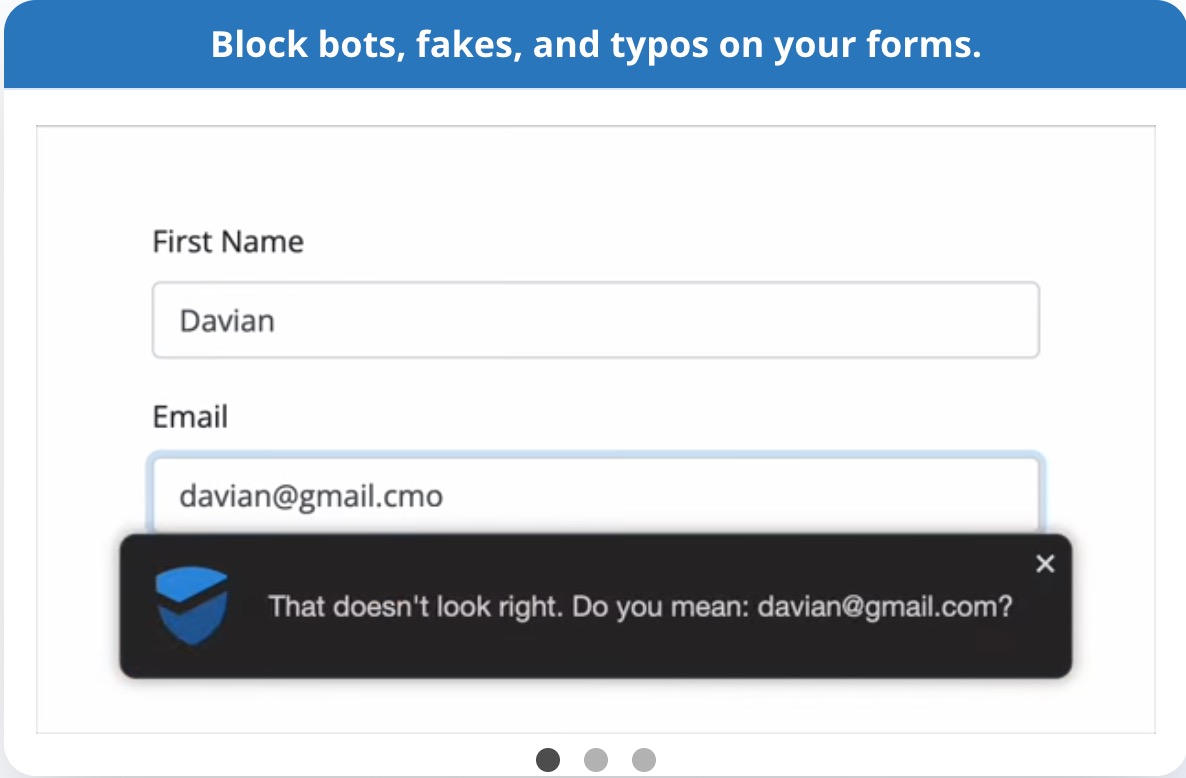
Real-time form defense refers to the proactive and cutting-edge measures taken to safeguard online forms against fraudulent submissions, automated bot interactions, and sophisticated scraping attempts like those from Puppeteer and Playwright scrapers. This technology works by employing FormDefender edge filtering—a technique that analyzes incoming traffic at the edge in real time to identify suspicious behavior. It continuously adapts, overcoming the honeypot limitations vs headless browsers challenge by detecting malicious headless browser scripts bypassing traditional traps.
For marketers using ClickFunnels and its latest 2.0 features, this means significantly improved lead quality. The system effectively filters out unreliable data before it enters your funnel, ensuring only legitimate traffic converts. This clean lead database leads to enhanced engagement and higher conversion rates, ultimately protecting your marketing investments and reducing costly mistakes like click fraud and bot opt-ins that result in wasted ad spend and compromised campaign accuracy.
Why Is Real-Time Protection Vital for Marketing Funnel Security?
Real-time protection is essential for safeguarding the integrity of marketing funnels, particularly in the context of paid traffic sources such as Facebook and Google PPC campaigns. Bots and fake leads flood your funnels, generating false conversion signals that the ad platform algorithms then interpret as positive performance. Consequently, your ads are optimized to target more low-quality or fraudulent traffic, leading to spiraling paid ad budget waste.
Moreover, this protection counters threats like affiliate commission fraud and fake lead generation, which can siphon commissions away undeservedly and undermine your marketing ecosystem. By preventing fraudulent entries, businesses maintain higher-quality leads, significantly improving return on investment (ROI). This security layer also enhances user experience and sustains trust with legitimate customers, which is increasingly valuable in today's competitive online landscape.
How Does ListDefender Seamlessly Integrate with ClickFunnels for Spam Protection?

Integrating ListDefender with ClickFunnels—including both Classic and the newer 2.0 pages—is a straightforward process designed to enhance your lead generation efforts with minimal friction. Here’s a detailed, step-by-step guide for embedding FormDefender into your funnels:
Step-by-Step Setup Instructions for ClickFunnels:
- Access Your ClickFunnels Account: Login and navigate to your funnel dashboard.
- Select Funnel and Page: Choose either your 2.0 checkout and opt-in funnel page or Classic page where you want to implement bot protection.
- Embed Custom Script for Head Tracking and Edge Filtering: Under the page's Settings > Tracking Codes section, paste the FormDefender custom script provided by ListDefender. This script enables advanced bot detection by dynamically tracking user interaction with the form without adding friction.
- Input Your API Key: Within the ListDefender dashboard, generate your API key and enter it into the integration settings as required.
- Activate Real-Time Filtering: Enable the real-time spam filtering options to begin blocking suspect leads instantly.
- Test Your Setup: Submit test forms with both legitimate and simulated bot submissions to confirm the defense mechanisms activate correctly without impacting true users.
Once integrated, ListDefender instantly begins filtering and protecting your forms from potential threats, strengthening your funnel's security against bot-driven traffic, fake leads, and affiliate fraud.
Which Features of ListDefender Enhance Form Spam Protection in Marketing Funnels?
ListDefender offers a comprehensive suite of features that enhance spam protection for marketing funnels and maintain lead quality:
- Real-Time Bot Protection with FormDefender Edge Filtering: Detects and blocks automated bot submissions, including sophisticated headless browsers and Puppeteer- or Playwright-based scrapers.
- Custom Script Embedding in ClickFunnels for Head Tracking: Uses lightweight footprint scripts to track user interactions frictionlessly, preserving conversion rates while accurately identifying bots.
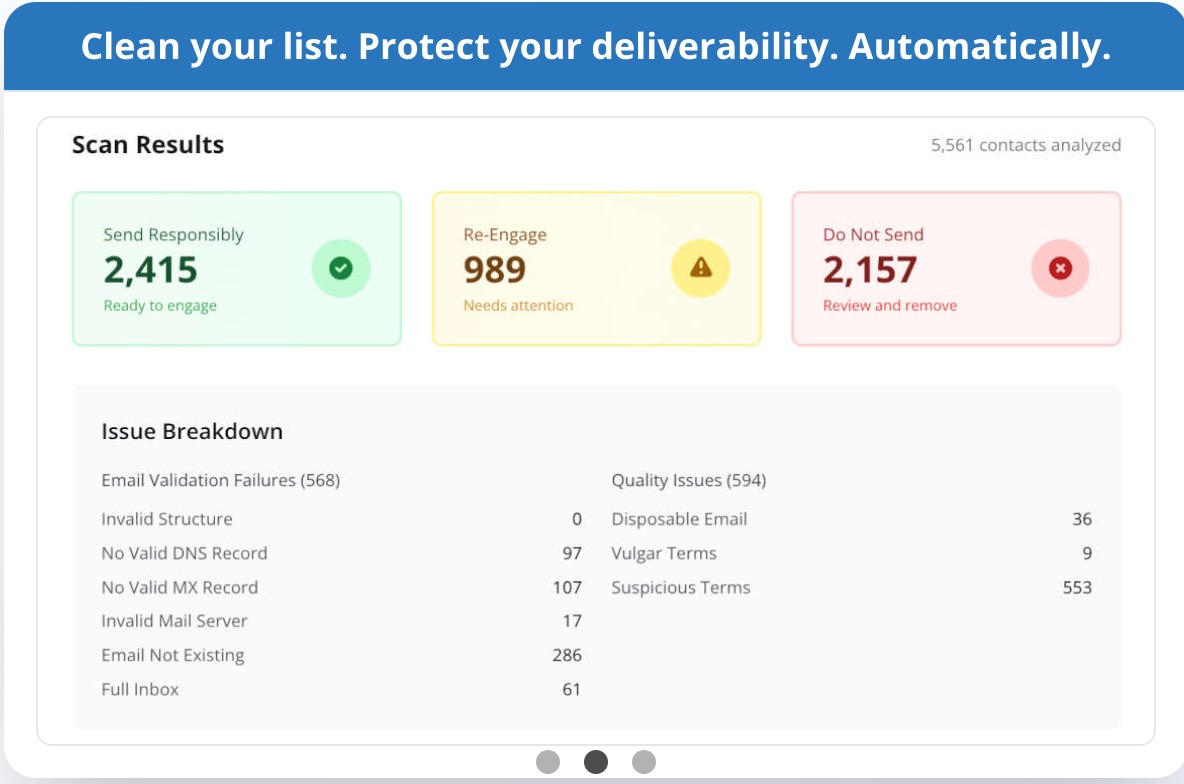
- Automated List Cleaning: Continuously sanitizes your lead database by removing invalid or suspicious entries to keep your lists fresh and actionable.
- Engagement Monitoring: Tracks and analyzes user behavior and engagement patterns to derive actionable insights for campaign optimization.
- Comprehensive Dashboard & Reports: Provides real-time analytics and alerts, enabling prompt responses to emerging threats.
These features combine to create an advanced defense mechanism that not only protects your marketing funnel from spam but also optimizes legitimate leads to maximize ROI.
Why Are Fake Leads and Bot Clicks Detrimental to Your Marketing Funnel Performance?
The flood of fake leads and bot clicks into your funnel can have severe, multi-faceted consequences:
- Increased Ad Spend Wastage: Fake leads and bots inflate conversion numbers falsely, prompting ad platforms like Facebook and Google to allocate more budget toward bad traffic sources. This click fraud drains your paid ad budgets with no real customer value return.
- Lower Conversion Rates: Interactions with low-quality or non-human leads skew funnel analytics, lowering your overall conversion metrics and creating misleading campaign data.
- Affiliate Commission Fraud: Fraudulent lead generation tactics can trigger unwarranted payouts, weakening affiliate program profitability and trustworthiness.
- Damaged Brand Reputation and Customer Trust: Repeated interactions with spam or fraudulent leads can result in poor customer experiences and brand distrust.
Thus, combating these issues proactively is vital for maintaining a successful and profitable marketing funnel ecosystem.
How Can Marketing Funnel Security Tools Minimize Lead Validation Errors?
Advanced marketing funnel security tools minimize lead validation errors by implementing dynamic, real-time validation and adaptive filtering strategies:
- Real-Time Validation: These tools monitor submission behavior live, allowing instant acceptance or rejection based on behavioral signals and data integrity checks.
- Continuous Criteria Updates: Validation rules evolve continuously to counteract emerging threat patterns, including new bot tactics and fraudulent scripts.
- Edge Filtering: Offloads filtering to network edges, reducing latency and avoiding funnel slowdowns or user frustration.
- Customizable Rules and Alerts: Tailor validation settings and receive notifications to optimize funnel security proactively.
This proactive, intelligent approach reduces false positives and negatives, ensuring genuine users are smoothly processed while malicious actors are blocked thoroughly.
What Are the Best Practices and Tools for Effective Form Spam Protection in ClickFunnels?
Implementing the following best practices will greatly strengthen your ClickFunnels spam defense strategy:
- Utilize Captchas Strategically: Integrate solutions like Google reCAPTCHA to filter automated bots, balancing security and usability.
- Employ FormDefender from ListDefender: Use real-time edge filtering and automated list management to catch increasingly sophisticated spam attacks.
- Regularly Analyze Lead Sources: Audit and trace lead origins to identify vulnerabilities or abuse points, enhancing filtering precision.
- Embed Custom Scripts Thoughtfully: Use head tracking and behavioral scripts to identify bots without introducing friction that could hurt conversions.
- Review Funnel Conversion Data Regularly: Watch for abnormal spikes in conversions that may indicate fraud, and adjust protections accordingly.
By following these recommendations, marketers can significantly enhance their funnel protection and maximize the value of their ad spend and lead generation efforts.
Comparison of Traditional CAPTCHA vs Native Honeypot vs FormDefender Real-Time Edge Defense
| Feature | Traditional CAPTCHA | Native Honeypot | FormDefender Real-Time Edge Defense |
|---|---|---|---|
| User Experience Impact | Can create friction, leading to drop-offs | Invisible but can be bypassed by advanced bots | Frictionless, no impact on conversions |
| Effectiveness Against Bots | Effective against simple bots, less so against advanced | Limited against headless browsers and scrapers | Detects sophisticated bots including Puppeteer, Playwright |
| Integration Complexity | Moderate; requires code and user interface elements | Easy; usually enabled by default | Simple; script embedding and API key setup |
| Adaptability to New Threats | Low; static challenges | Very low; easily bypassed by evolving bots | High; continuous updates and edge filtering |
| Impact on Conversion Rates | Potentially negative due to added friction | Neutral but ineffective against advanced threats | Positive; protects without user friction |
Which Fake Lead Prevention Tools Integrate Smoothly with ClickFunnels?
Several tools can effectively integrate with ClickFunnels for fake lead prevention:
- ListDefender: Offers real-time protection against spam, click fraud and bot opt-ins, and automated bots with seamless integration.
- Google reCAPTCHA: Provides a recognized barrier against bots during form submissions, although it can introduce user friction.
- Email Verification Services: These tools validate email addresses at the point of entry, ensuring only legitimate contacts are added to your list.
These tools collectively improve lead quality and help maintain the integrity of the marketing funnel while preventing wasteful ad spend.
How Have Businesses Benefited from Real-Time Form Defense: Case Studies & User Testimonials
Numerous businesses have seen quantifiable improvements from implementing real-time form defense mechanisms. They report higher conversion rates, reductions in fake leads, and healthier lead lists after adopting technologies like ListDefender, particularly within ClickFunnels environments.
Which Real-World Examples Demonstrate Successful Bot Blocking on ClickFunnels?
One prominent case involved an e-commerce site that faced a barrage of bot clicks on its landing pages, including their ClickFunnels 2.0 checkout and opt-in funnels. After integrating ListDefender's advanced FormDefender edge filtering technology, the business reported a significant reduction in fraudulent submissions within the first month. This enhanced lead quality directly contributed to an increase in sales conversions and a notable improvement in paid ad spend efficiency.
Which Resources Assist New Users in Optimizing Their Funnel Security Quickly?
For newcomers looking to enhance their funnel security, valuable resources include comprehensive guidebooks outlining best security practices, detailed walkthroughs for implementing tools like ListDefender, and active community forums where marketers exchange insights about combating fake leads, bot protection, and fraud prevention in ClickFunnels funnels.
Technical Troubleshooting FAQ
Q1: Why isn’t FormDefender blocking all spam entries?
A1: Ensure that the custom script is correctly embedded in your funnel’s head tracking section and that your API key is properly entered in ListDefender’s integration settings. Also, confirm that real-time filtering is enabled. If problems persist, review network and firewall settings that might block traffic to ListDefender’s servers.
Q2: Can FormDefender cause issues with legitimate users or reduce conversion rates?
A2: FormDefender is designed for frictionless user experience and should not negatively impact conversion rates. However, test your forms thoroughly after setup to ensure no false positives. Adjust sensitivity settings in your ListDefender dashboard as needed.
Q3: How do I verify that FormDefender is actively protecting my funnel?
A3: Use the ListDefender dashboard to monitor live activity and spam blocks. You can also perform test submissions mimicking bot behavior to ensure the system triggers protections.
Q4: Does FormDefender work with both Classic and ClickFunnels 2.0 pages?
A4: Yes, it is fully compatible with both funnel types, with specific setup guides for each to embed scripts appropriately.
Q5: What if I encounter script conflicts when embedding FormDefender?
A5: Check for other third-party scripts or plugins that might interfere. Temporarily disable conflicting scripts and re-enable them one by one while testing FormDefender. Contact ListDefender support for complex conflicts.
How Can You Get Started with ListDefender: Booking Walkthroughs and Onboarding Tips?
To get started with ListDefender, follow these steps:
- Visit the Website: Explore available packages and choose the one that suits your needs at listdefender.com/pricing.
- Book a Walkthrough: Schedule a consultation to understand how to implement the software optimally for your ClickFunnels funnels.
- Follow Onboarding Recommendations: Take advantage of onboarding materials, tutorials, and support documentation to familiarize yourself with features and best practices.
By taking these proven steps, businesses can effectively protect their ClickFunnels accounts from fake opt-ins, bot clicks, click fraud, and affiliate commission fraud, thereby enhancing overall campaign performance and preserving marketing budgets.
Protect Your ClickFunnels Funnels Today
Stop fake leads and bot traffic from draining your ad budget. Integrate ListDefender’s FormDefender for real-time, edge-level spam defense and boost your funnel’s conversion integrity.