Gmail & Yahoo Sender Requirements: The Complete Small Business Compliance Checklist
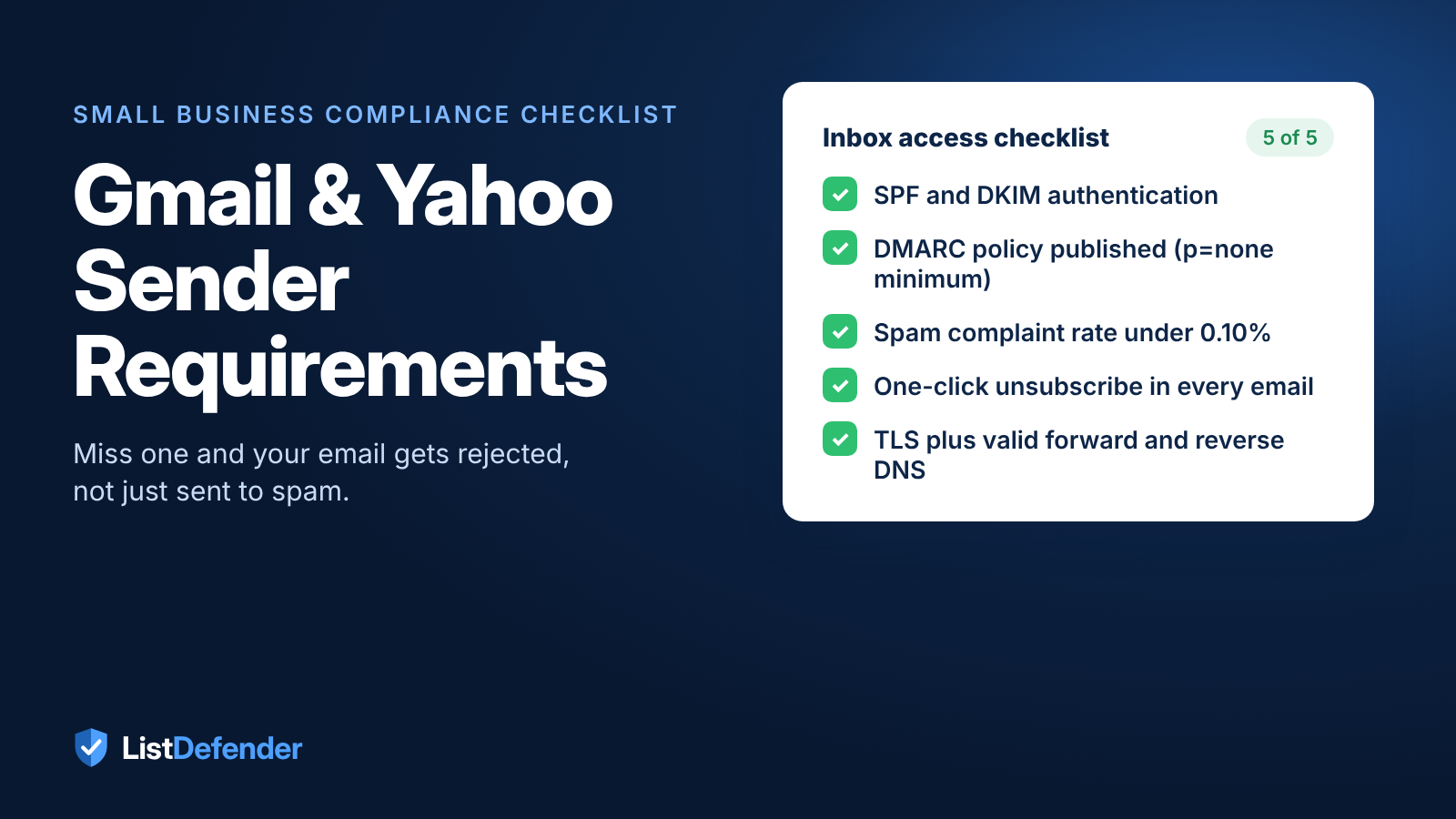
The Gmail and Yahoo sender requirements decide whether your emails reach the inbox at all. If you send in volume, you need SPF, DKIM, and DMARC set up, a spam complaint rate under 0.10%, and one-click unsubscribe in every marketing email. Since November 2025, Gmail has been rejecting non-compliant mail outright instead of quietly sending it to spam. ListDefender helps small businesses stay compliant by automatically removing invalid contacts and blocking bots before they cause spam complaints.
Key Takeaways
- SPF, DKIM, and DMARC are mandatory if you send around 5,000 or more emails a day to personal Gmail or Yahoo addresses.
- Your spam complaint rate must stay under 0.10%. Reaching 0.30% triggers enforcement.
- Since November 2025, non-compliant mail gets rejected, not just filtered to spam.
- Clean lists are the easiest way to keep complaints down. Automatic list cleaning removes the invalid and disengaged addresses that cause complaint spikes.
What Are the Gmail and Yahoo Sender Requirements?
Google and Yahoo now enforce strict technical standards for anyone sending email in volume. Ignore them, and you lose inbox access. As InboxWarm's 2026 compliance guide points out, non-compliant mail now faces outright rejection rather than a quiet trip to the spam folder.
Who counts as a bulk sender?
Google defines a bulk sender as anyone who sends close to 5,000 or more messages in a single day to personal Gmail accounts. Yahoo follows a similar standard. A few details matter for small businesses:
- Hitting the threshold once is enough. Bulk sender status is permanent.
- All messages from the same primary domain count toward the total.
- Only personal inboxes count. Emails to Google Workspace or other business addresses don't.
What's on the compliance checklist?
Here's what Gmail and Yahoo expect from bulk senders:
- SPF and DKIM authentication for your sending domain
- A published DMARC policy (p=none is the minimum) with passing alignment
- A spam complaint rate below 0.10% in Google Postmaster Tools
- One-click unsubscribe in every marketing email, honored within two days
- TLS encryption plus valid forward and reverse DNS records
Compliance is pass/fail. Either your setup passes inspection, or the mailbox providers block the connection.
Why Do These Rules Matter for Small Businesses?
The Gmail and Yahoo sender requirements apply to small businesses exactly the same way they apply to enterprise senders. There's no small business exemption, and there are no warnings first. Non-compliant domains get rejected.
The biggest risk for most small businesses isn't the technical setup. It's list quality. Bots, fake sign-ups, and disengaged contacts damage your sender reputation, tank your deliverability, and make every campaign less effective.
Fake sign-ups increase every year, and small businesses are easy targets because they rely so heavily on online forms and automations. Each fake address that gets into Keap, HighLevel, ActiveCampaign, or Kit quietly degrades your list, usually long before the business owner notices anything is wrong.
What happens when a small business ignores list hygiene?
It usually happens in three stages:
- Spam complaints climb as fake and disengaged addresses pile up.
- Inbox providers flag your sending domain for poor list practices.
- Your legitimate campaigns land in spam or get blocked entirely.
ListDefender stops that cycle with automatic list cleaning and real-time form protection. It removes invalid, disposable, and low-quality addresses before they hurt your sender reputation and stops bots at the form so they never reach your database. Our email deliverability guide walks through the full set of steps to protect your inbox placement in 2026.
How Do You Authenticate Your Sending Domain?
Domain authentication proves you are who you say you are. Without it, inbox providers can't tell your email apart from a spoofed message. It's the technical foundation of the Gmail and Yahoo sender requirements, and every small business sending marketing email needs it.
What are SPF, DKIM, and DMARC?
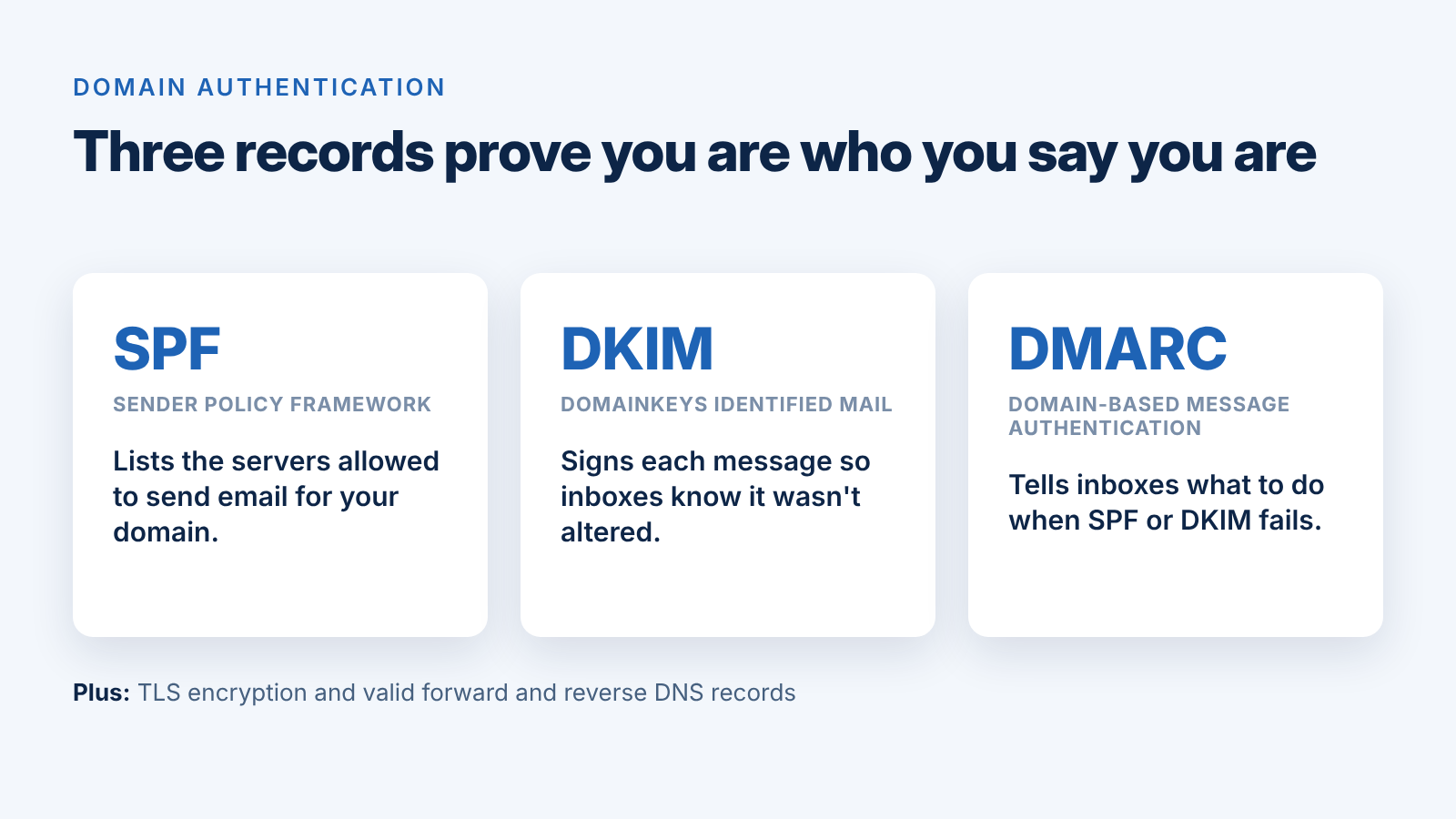
- SPF (Sender Policy Framework) lists the servers that are allowed to send email for your domain.
- DKIM (DomainKeys Identified Mail) adds a cryptographic signature that proves your message wasn't altered in transit.
- DMARC (Domain-based Message Authentication, Reporting, and Conformance) tells receiving servers what to do when SPF or DKIM checks fail.
Every sender needs SPF or DKIM. Bulk senders need both, plus a DMARC policy of at least p=none with passing alignment. If any of these records is missing, you risk rejection from Gmail and Yahoo.
What other technical setup is required?
Your sending domain and IP also need valid forward and reverse DNS records, and your messages must be sent over a TLS-encrypted connection. Most major email platforms handle this for you, but it's worth confirming with your provider.
How does list hygiene support authentication?
Authentication gets your mail accepted. List quality keeps it accepted. ListDefender integrates with Keap, HighLevel, ActiveCampaign, ClickFunnels, and Kit to clean your list automatically, removing the invalid and disposable addresses that drive spam complaints. A clean list protects the reputation your authentication records help you build.
What Is the One-Click Unsubscribe Rule?
Bulk senders must let recipients unsubscribe with a single click, and the request has to be processed within two days.
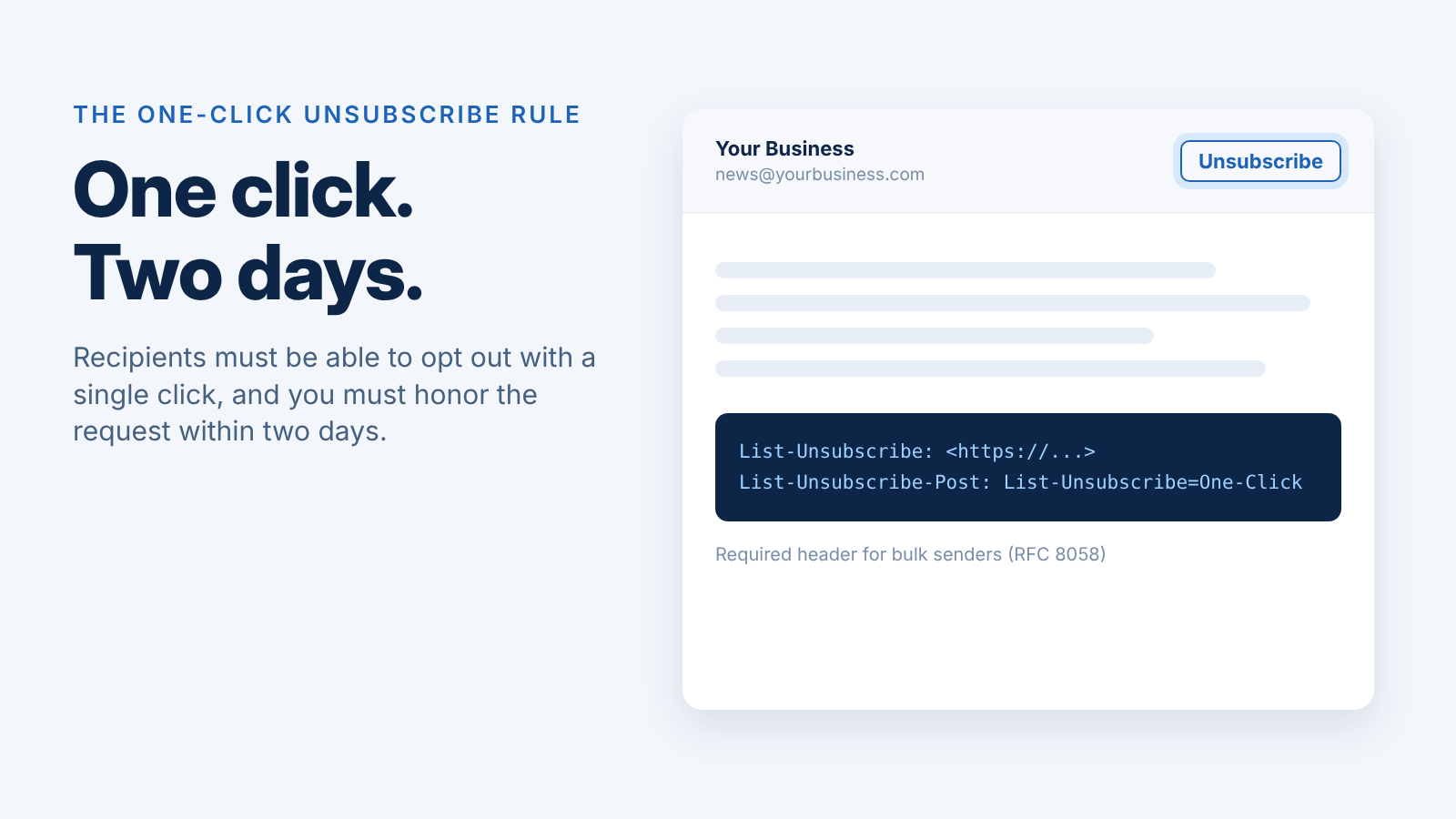
Google and Yahoo enforce this through RFC 8058, a standard that puts the unsubscribe option directly in the email header. Most inboxes then show an "Unsubscribe" button right next to your sender name. If the header is missing, your email can be rejected before it ever reaches the inbox.
Why does one-click unsubscribe matter for small businesses?
Small businesses on Keap, HighLevel, or ActiveCampaign face the same threshold as enterprise senders. One day above 5,000 messages locks in the requirement permanently.
And here's the upside: when unsubscribing is easy, frustrated subscribers leave instead of hitting "Report spam." That protects your complaint rate.
How does removing disengaged subscribers protect deliverability?
Every email that gets ignored raises the odds of a spam complaint. ListDefender monitors engagement automatically, identifies disengaged contacts before they complain, and cleans your list without manual exporting or importing. It also blocks bots and fake sign-ups at the form, so low-quality addresses never get in.
How Can You Keep Your Spam Rate Low?
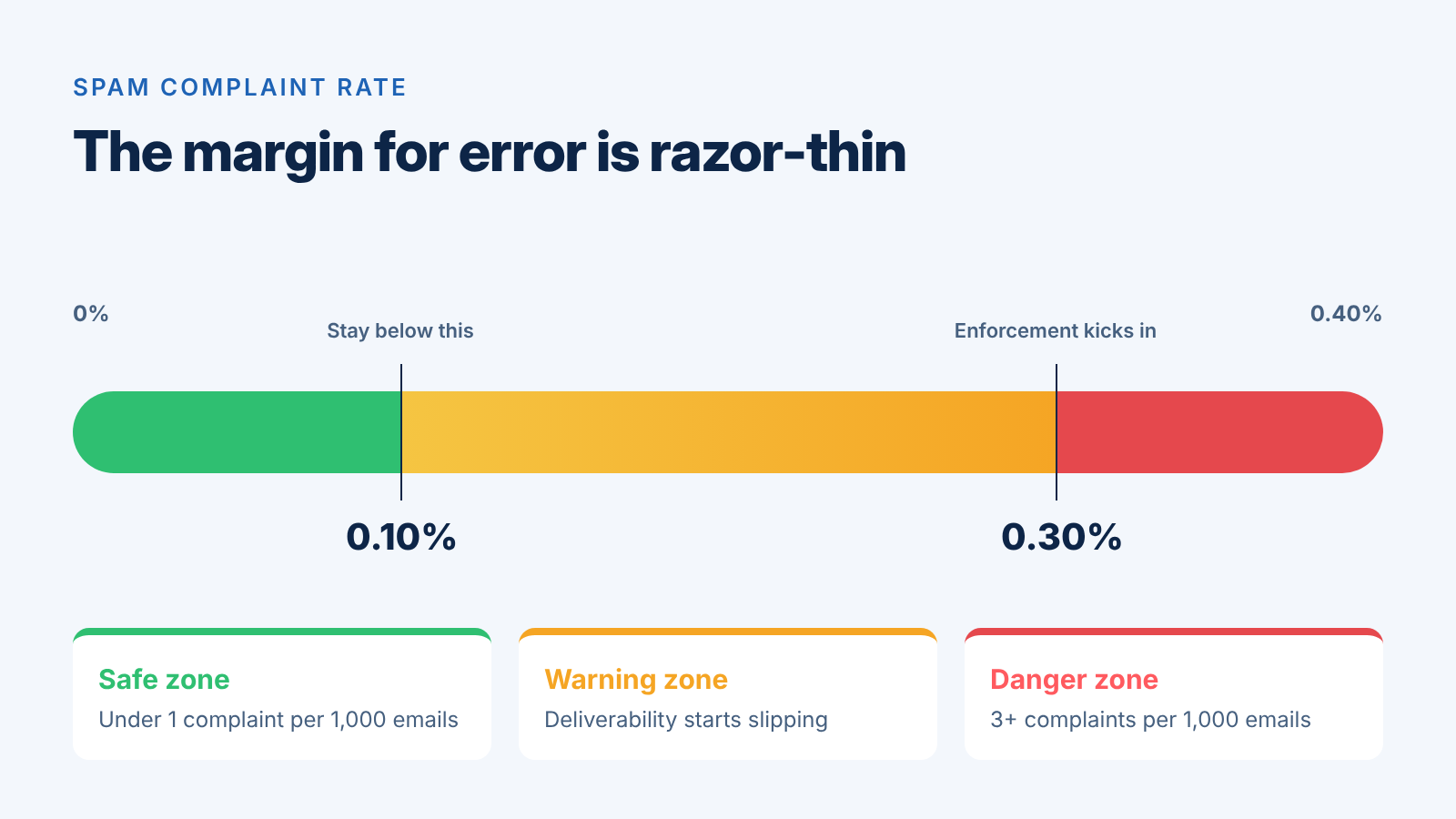
To meet the Gmail and Yahoo sender requirements, your spam complaint rate needs to stay under 0.10% and should never reach 0.30%. That's one complaint per 1,000 emails. Google Postmaster Tools tracks this number continuously, and most small businesses never look at it until deliverability collapses.
What happens when spam rates climb?
A single subscription bombing attack can flood your forms with fake addresses and ruin your email deliverability. Those addresses pollute your email platform or CRM, your welcome emails go out to people who never signed up, and complaints spike. ListDefender's real-time form protection stops these bots before they reach Keap, HighLevel, ActiveCampaign, or Kit.
How does list scrubbing help?
Proactive email list cleaning catches invalid and disengaged addresses before complaints build up. A good scrubbing service removes invalid and risky addresses so only genuine subscribers stay on your list.
Three habits keep your spam rate low:
- Check Google Postmaster Tools weekly for complaint spikes.
- Block bot submissions on every form with real-time protection.
- Clean your list automatically to remove invalid and disposable addresses.
FAQ
What are the Gmail and Yahoo sender requirements for small businesses?
If you send around 5,000 or more emails a day to personal Gmail or Yahoo addresses, you need SPF, DKIM, and DMARC, one-click unsubscribe, and a spam complaint rate under 0.10%.
What happens if I don't meet the Gmail and Yahoo sender requirements?
Your mail can be rejected outright, which means it never reaches the inbox or even the spam folder.
What spam complaint rate triggers enforcement?
Keep your rate under 0.10% in Google Postmaster Tools. Reaching 0.30% triggers enforcement from inbox providers.
How does ListDefender help me stay compliant?
ListDefender automatically removes invalid contacts and blocks bots at your forms, which prevents the complaint spikes that push domains past the limits.
Conclusion
For small businesses that want their emails to reach the inbox, the Gmail and Yahoo sender requirements aren't optional. Authenticate your domain, add one-click unsubscribe, and keep your spam rate below the limit. ListDefender automates the list hygiene and form protection that keep those numbers in line. Your next step: audit your current setup and put those protections in place before a rejection forces the issue.